 Live Ride
Why use your iPhone as a bike computer?
A dedicated head unit is one more thing to buy, charge and update. Your iPhone already has GPS, a large high-resolution screen, maps and a mobile connection, and it's in your pocket on every ride anyway. Mount it on your bars and a good app gives you everything a bike computer does:
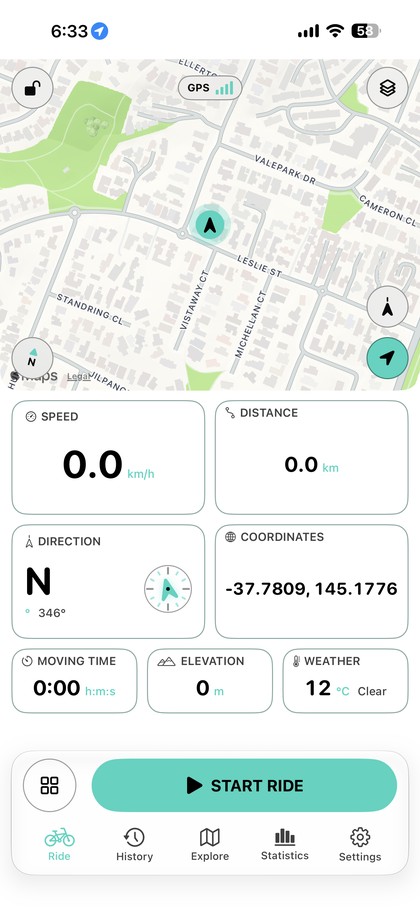
- Live numbers you can read at a glance: speed, distance, moving time, climbing, grade and more.
- A live map with your route and turn-by-turn cues.
- A ride history with stats, records and weekly goals, without a separate account.
Leave it in your jersey pocket instead and you still get the full recording, plus your speed, distance and moving time on the Lock Screen.
A dashboard you set up yourself
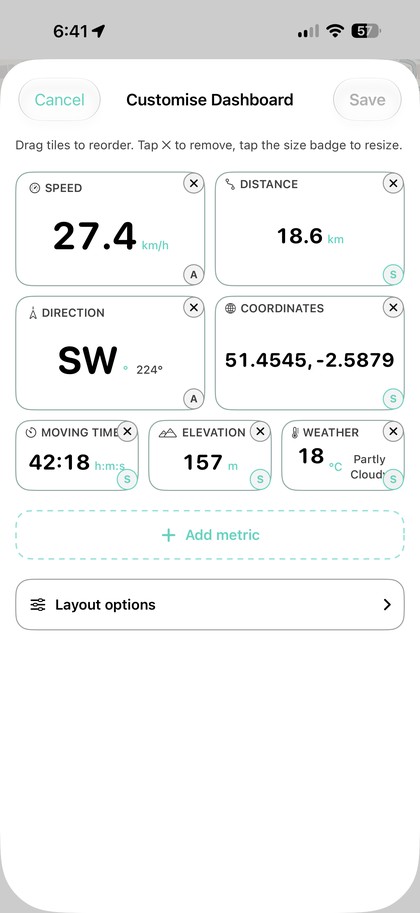
Live Ride's dashboard has more than 20 live metrics: speed, pace, distance, times, elevation, ascent, grade, heading, weather, calories, heart rate, cadence, power and more. Make each tile small, medium or large, choose one of three map sizes and drag everything into the order you want.
Save separate layouts as presets, for example one for road rides, one for climbing and one for exploring, and switch between them in one tap, even mid-ride. Spoken updates can read out distance, time and speed at the interval you choose.
GPS data you can trust
Phone GPS has a reputation for wobbly numbers. Live Ride filters out jumps, bad fixes and stale points before they reach your distance, and smooths speed, elevation and grade so they read steadily instead of jittering.
- Auto-pause stops the clock at lights and cafés, with adjustable sensitivity.
- Background recording keeps going when you lock the phone or switch apps.
- Crash recovery saves the ride if the app is closed mid-ride.
- A battery-saving display dims the dashboard while you're moving, and you get a heads-up if you start a ride low on charge.
Routes and turn-by-turn navigation
Plan a round trip or a one-way ride from any address, built to the distance you want and avoiding highways and tolls. On the road, turn banners appear on the map, with optional spoken directions. Already have a route from a club or a friend? Import the GPX file and follow it on the live map.
No subscription, no account
Most cycling apps want a monthly fee and an account before you've ridden a metre. Live Ride works differently:
- Your first 10 rides are free, with every recording, dashboard and route feature and the Apple Watch app.
- Live Ride Pro is a single, one-time App Store purchase that unlocks unlimited rides and bike maintenance tracking. Nothing renews.
- There's no sign-up. Rides, routes and bikes are stored on your iPhone, and rides you've already recorded are never locked.
Your data stays portable: export any ride as GPX, back everything up to a single file, and optionally save rides to Apple Health.
Get set up in a few minutes
- Download Live Ride and allow location access so it can record your rides.
- Pick metric or imperial, and light, dark or high contrast. High contrast is built for bright sunlight.
- Arrange your dashboard, or start with the default layout.
- Mount your phone, or pop it in your pocket, and press start. You can also say “Start a ride in Live Ride” or use the Action Button.
Try Live Ride free. Your first 10 rides are on us, no account needed.
Download on the App Store