 Live Ride
What you see on your wrist
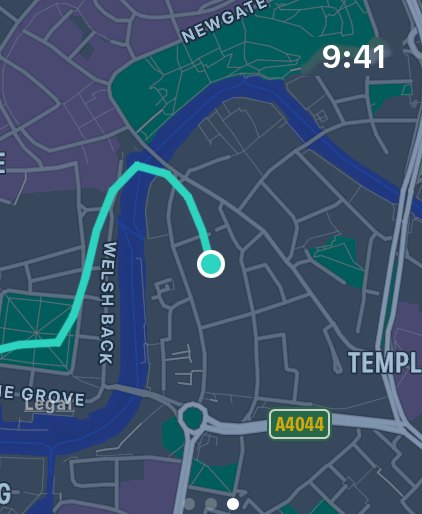
The Live Ride watch app shows your speed, distance, moving time and climbing while you ride. Pause, resume and finish right on the watch, and swipe across for a map of your route so far and where you are on it.
You choose which stats the watch shows, straight from the watch: speed, distance, heart rate, average speed, climbing, cadence or power.
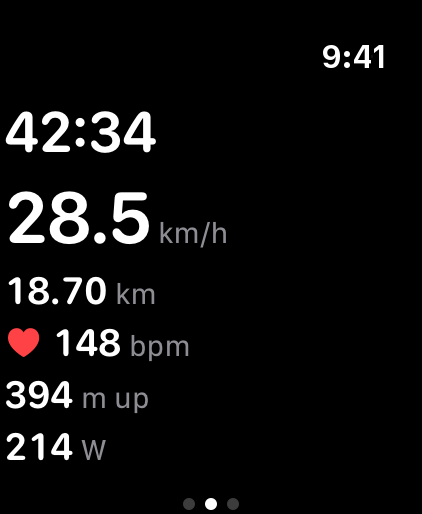
Heart rate, cadence and power
Your watch records heart rate onto every ride, with average and maximum heart rate saved in your ride history and, if you turn it on, in Apple Health. Cadence and power from sensors paired with your Apple Watch are recorded too, and they all have their own tiles on the iPhone dashboard.
Riding with your iPhone and watch together
Start a ride on your iPhone and the watch app opens by itself, so your phone can stay mounted on the bars, or in a pocket, while the watch shows the numbers. Everything ends up in one ride on your iPhone: the GPS track, the stats and the heart rate.
Riding with just your Apple Watch
Leave your iPhone at home and the watch records the ride with its own GPS. The ride moves to Live Ride on your iPhone the next time the phone is nearby, where you get the full ride detail: route map, stats, elevation profile and personal bests.
Requirements and pricing
- Apple Watch with watchOS 10 or later, paired with an iPhone running Live Ride on iOS 17 or later.
- Your first 10 rides are free, and the Apple Watch app is included in them.
- After that, it's a one-time purchase. Keep the watch app with Pro + Watch, or add it to Live Ride Pro any time from Settings. Nothing renews, and there's no account to create.
Try Live Ride free. Your first 10 rides are on us, no account needed.
Download on the App Store